

Let’s clear up a myth first: procrastination has almost nothing to do with laziness. If you’ve ever procrastinated on something you genuinely wanted to do, a creative project, a trip you were excited about, a message to someone you care about, you already know discipline isn’t the missing ingredient. Something else is going on.

Behavioral research points to a simpler explanation: procrastination is an emotional regulation problem, not a time management one. You’re avoiding a task because it triggers boredom, anxiety, or self-doubt in the moment and your brain chooses short-term relief over long-term benefit almost every time, because that’s just how it’s wired.
Digital tools won’t fix your relationship with difficult emotions. But the right ones can interrupt the specific patterns that let procrastination take hold friction, ambiguity, and the absence of visible consequences. This is a practical look at which tools do that job well, and which just add more apps to ignore.
Why Willpower-Based Advice Keeps Failing You
Most productivity content treats procrastination like a motivation gap “just push through,” “want it more,” “build discipline.” This advice fails because it misdiagnoses the problem. You don’t lack the desire to finish the report. You’re avoiding the discomfort of starting it, and no amount of wanting to be productive removes that discomfort in the moment.
The tools that actually work don’t try to manufacture motivation. They reduce friction, shrink ambiguity, or introduce a visible cost to avoidance, three angles that target the real mechanism instead of the surface symptom.
The Three Ways Digital Tools Actually Interrupt Procrastination
Reducing friction — making the first step so small and so easy to start that avoidance loses its appeal. A task that takes one click to begin is harder to avoid than one that requires opening five things first.
Shrinking ambiguity — vague tasks (“work on project”) are procrastination magnets because your brain can’t locate a concrete starting point. Tools that force specificity remove the excuse.
Creating visible stakes — accountability tools that make avoidance socially or visually uncomfortable tip the balance, because procrastination thrives in private, low-consequence environments.
Every recommendation below fits into one of these three categories. Knowing which one you’re weakest against helps you pick the right starting tool instead of collecting five apps that all do the same thing.
Common Mistakes People Make Before Even Trying a Tool
It’s worth clearing these up before recommending anything specific, because they undermine every tool on this list if left unaddressed.
- Believing the next app will fix a mindset problem. No timer or tracker resolves anxiety about a task, it can only reduce the friction around starting it.
- Downloading three apps at once. Trying everything simultaneously means mastering nothing. One tool, tested properly, beats five tools ignored.
- Setting the bar too high on day one. Committing to two hours of deep focus immediately usually backfires. Fifteen minutes that actually happens beats two hours that gets postponed again.
- Using blockers without addressing why you’re avoiding the task. Blocking distracting sites helps, but if the underlying task still feels overwhelming, you’ll just find a new way to avoid it.
- Expecting streaks and gamification to work forever. These help build initial momentum but tend to lose power once the novelty fades, pair them with something more durable.
- Ignoring environment. The best app in the world doesn’t help if your phone is sitting face-up next to you buzzing every four minutes.
Tool Category 1: Focus Timers (Reduce Friction)

The Pomodoro method, 25 minutes of focus, 5-minute break works because it makes starting feel smaller. “Work for 25 minutes” is a fraction as intimidating as “finish this project.”
Forest turns this into something visual: you plant a virtual tree that grows during your focus session and dies if you leave the app early. It sounds gimmicky, but the small visual stake is often enough to keep a phone untouched for 25 minutes when nothing else has worked.
Focus Keeper and similar basic timer apps skip the gamification and just handle the interval structure cleanly, useful if you find gamified apps distracting in their own right.
Tool Category 2: Website and App Blockers (Remove the Easy Escape)

Procrastination often isn’t a decision, it’s a reflex. You feel resistance to a task, and your hand is on your phone before you’ve consciously decided to pick it up. Blockers interrupt that reflex by making the escape route inconvenient.
Freedom blocks distracting sites and apps across devices simultaneously, which matters because blocking a site only on your laptop while your phone sits nearby defeats the purpose entirely.
Cold Turkey offers a stricter option, including a “frozen turkey” mode that can’t be disabled early even if you change your mind mid-session, which is either exactly what you need or overkill, depending on how much you trust your future self in the moment.
Tool Category 3: Task Breakdown Tools (Shrink Ambiguity)

Vague tasks are procrastination’s favorite hiding spot. A digital task manager that forces you to define a concrete next action does more than organize, it removes the ambiguity that was letting you avoid starting.
Todoist and Notion both work well here, not because of their feature sets, but because the act of typing a task forces you to articulate it specifically. “Write report” sitting in your head is vague. “Write report” typed into a task app with a due date still isn’t specific enough, the trick is adding a next-action field: “Open doc, write the first paragraph of the intro.” That level of specificity is what actually reduces avoidance.
Tool Category 4: Accountability and Visible Stakes

Habitica turns tasks into a role-playing game where failing to complete them has in-game consequences losing health, missing rewards. For people motivated by gamified stakes, this creates just enough visible cost to avoidance that skipping a task stops feeling free.
Beeminder takes a sharper approach: you set a goal, and missing it costs you real money, charged automatically. It’s not for everyone, the idea of financial stakes for procrastination feels aggressive to some people but for tasks where nothing else has worked, the visible, immediate cost of avoidance can break patterns other tools can’t touch.
Comparing the Options at a Glance

| Tool | Mechanism | Best For | Free Version? | Intensity |
|---|---|---|---|---|
| Forest | Visual stake + timer | Phone-based distraction | Yes (limited) | Gentle |
| Focus Keeper | Simple interval timer | Distraction-free focus sessions | Yes | Gentle |
| Freedom | Cross-device blocking | Removing the escape route entirely | Trial only | Moderate |
| Cold Turkey | Strict blocking, no override | Chronic self-negotiators | Yes (basic) | Strong |
| Todoist / Notion | Task specificity | Vague, overwhelming task lists | Yes | Gentle |
| Habitica | Gamified accountability | People motivated by game mechanics | Yes | Moderate |
| Beeminder | Financial consequence | Long-standing avoidance patterns | Trial only | Strong |
Start gentle. Escalate only if the softer tools genuinely aren’t shifting the pattern after a real two-week trial, not after one bad day.
How This Actually Looks Day to Day
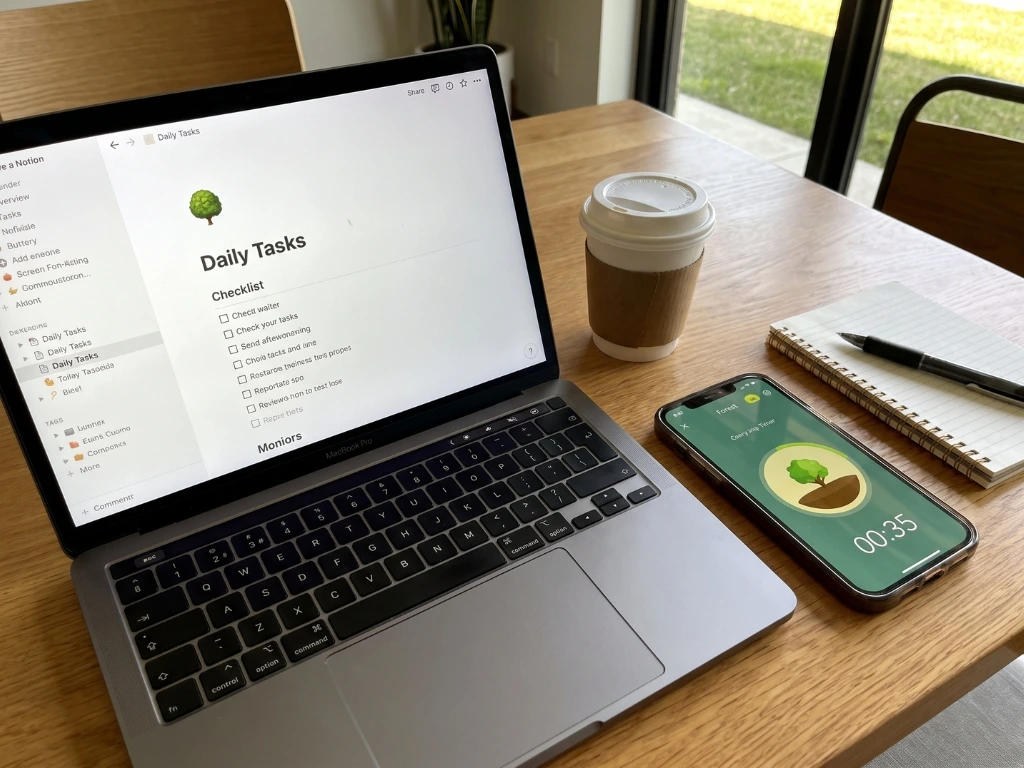
Someone dealing with chronic task avoidance rarely needs all seven tools above. A more realistic setup: a focus timer for starting sessions, a task manager with next-action fields for shrinking ambiguity, and only if those two aren’t enough, a blocker for the specific app or site that’s the biggest daily trap.
Picture a graduate student who’d been putting off her thesis literature review for three weeks. The task itself wasn’t hard, it was vague. “Work on literature review” had no clear entry point, so her brain kept finding reasons to check email instead. She broke it into next-actions in Notion, “read and summarize one paper” instead of “work on review” and paired that with 25-minute Forest sessions. The task didn’t get easier. It got specific enough to start. Three weeks of avoidance ended within four days of that change, not because she suddenly found more willpower, but because the ambiguity that was fueling the avoidance was gone.
Pro Tips for Making Any of These Actually Stick
- Match the tool to the specific friction point, not the trend. If your problem is phone distraction, a task app won’t fix it. If your problem is vague tasks, a blocker won’t fix it. Diagnose before choosing.
- Lower the starting bar deliberately. Commit to five minutes, not fifty. Momentum built from an easy start carries further than willpower spent forcing a long one.
- Physically separate yourself from your phone during focus blocks, not just app-block it. Visual proximity alone re-triggers the reflex even when the app is blocked.
- Review what’s actually working every two weeks. Gamified tools especially tend to lose their pull once the novelty fades, swap or combine approaches before that happens, not after motivation has already crashed.
- Pair digital tools with a five-minute “why am I avoiding this” check-in. Sometimes the honest answer (fear of doing it badly, unclear instructions, task is genuinely bigger than it looks) points to a fix no app can provide and naming it removes some of its power anyway.
Questions People Ask About This
- Are procrastination apps actually effective, or is it just willpower in disguise? They’re effective specifically because they reduce friction, ambiguity, or the ease of escape, not because they manufacture motivation. The mechanism matters more than the app’s popularity.
- What’s the single best app to start with if I’ve never tried any of these? A basic focus timer like Forest or Focus Keeper, low commitment, immediate feedback, and it addresses the friction of simply starting, which is where most procrastination happens.
- Do website blockers actually work, or do people just find ways around them? They work best when paired with genuine intent to change, not as a substitute for it. Stricter tools like Cold Turkey remove the option to negotiate with yourself mid-session, which helps for people who otherwise always find the workaround.
- Is gamifying tasks (like Habitica) actually sustainable long-term? It’s strong for building initial momentum but tends to lose effectiveness as the novelty wears off. Many people use it as a bridge to build the habit, then transition to a simpler system once consistency is established.
- Why do financial-stakes tools like Beeminder feel so intense? Because they’re designed to create a cost that’s impossible to ignore or rationalize away, which is exactly why they work for patterns that gentler tools haven’t touched, though they’re not necessary for everyone.
- Can I use more than one type of tool at the same time? Yes, and often the combination works better than any single tool, a focus timer for starting, plus a task manager for specificity, addresses two different mechanisms at once.
- How long should I try a tool before deciding it doesn’t work? At least two weeks of genuine, consistent use. A single bad day or a single skipped session isn’t evidence the tool has failed, it’s evidence you’re human.
- Does procrastination ever have a cause that no app can fix? Often, yes. If a task triggers real anxiety, perfectionism, or fear of judgment, tools can reduce the friction around starting, but the underlying feeling may need more direct attention, sometimes that means talking it through with someone rather than downloading another app.
- Are free versions of these tools good enough, or do I need to pay? For most people, free versions are genuinely sufficient to test whether a mechanism works for you. Save paying for the tool that’s already proven useful in your free trial, not the one you’re hoping will work.
- What’s the biggest sign that a tool isn’t actually addressing my procrastination? If you’re still avoiding the task despite using the tool consistently, the issue likely isn’t friction or ambiguity, it’s probably the emotional discomfort underneath, which needs a different kind of attention than an app can offer.
The Real Starting Point
No tool on this list replaces understanding why a specific task feels hard to start. But most procrastination isn’t a mystery once you look closely, it’s friction, vagueness, or the absence of any real cost to avoiding it.
Pick the mechanism that matches your actual pattern. If tasks feel too big and vague, start with next-action breakdowns. If your phone is the trap, start with a blocker. Test it properly for two weeks before adding anything else.
The goal was never to out-discipline procrastination. It was to remove whatever was letting it win by default.